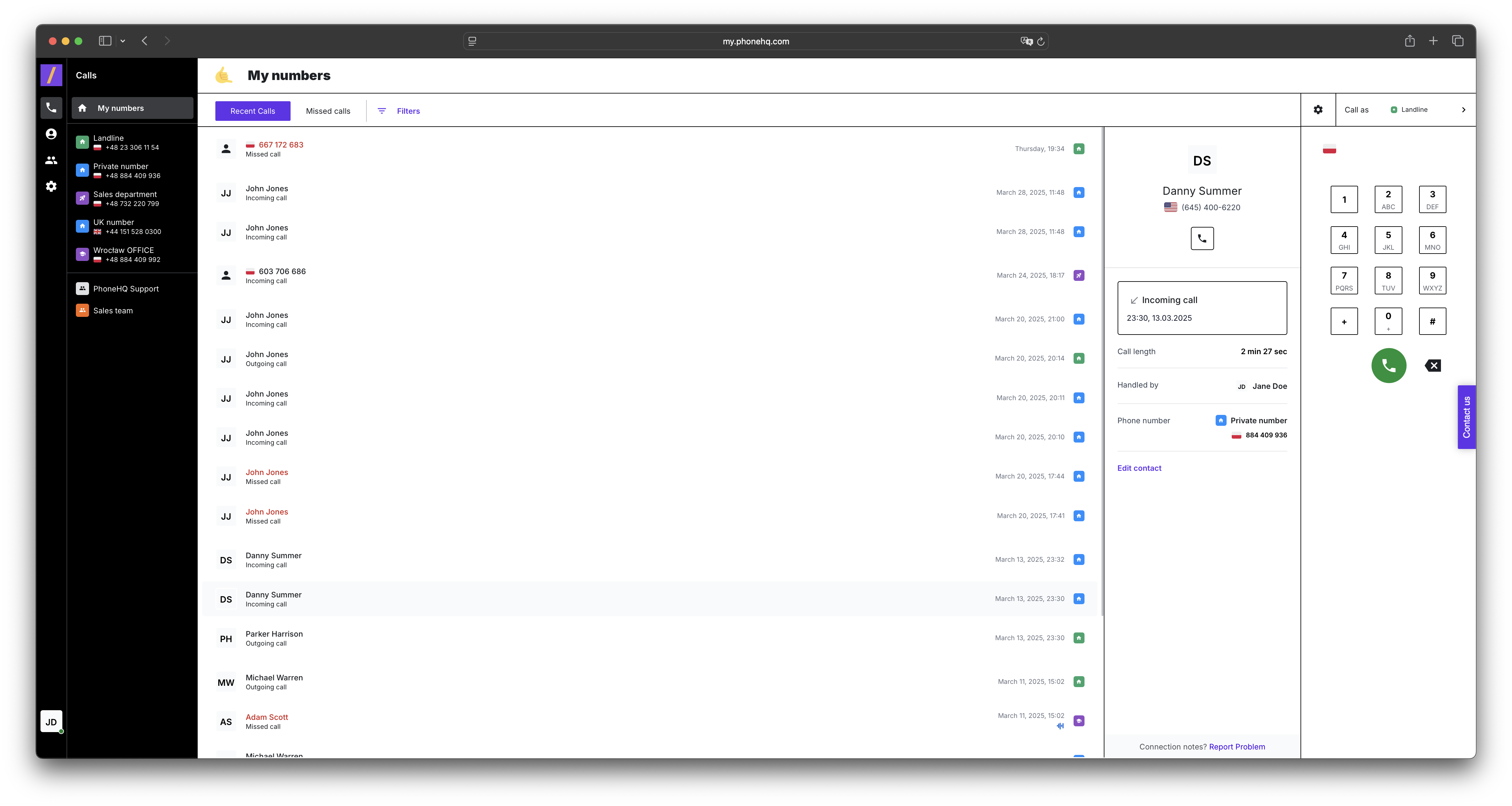
On the left side of the screen, you'll find a panel with a list of categories and phone numbers.
Categories: This includes groupings like "My numbers", under which your phone numbers are listed.
Phone Numbers: Each number is displayed along with its assigned name (if any), country (indicated by a short code, e.g., AU for Australia, US for the United States, PH for the Philippines), and the phone number itself.
Icons and Statuses: Next to the name or number, you'll see country flag icons indicating the number's country of origin.
When you select a number from the "My numbers" list on the left, the call history for that specific number will appear on the right side of the screen.
The recent calls list provides the following information for each call:
Phone Numbers: The phone number you called or received a call from.
Call Type:
Outgoing call: A call you made.
Missed call: A call you didn't answer.
Incoming call: A call you received.
Call Dates and Times: The exact date and time of the call (e.g., Thursday, 5:17 PM; Wednesday, 11:33 PM).
Time Since Last Call: Information about how long ago the call occurred (e.g., "22 minutes ago," "1 hour ago").
When you click on a specific call in the "Recent Calls" list, detailed information about that call will be displayed on the right side:
Number: The phone number you called or received a call from.
Type: The call type ("Outgoing call," "Missed call," "Incoming call").
Date and Time: The complete date and time of the call.
Recording: A playback option for the call recording, if the recording feature is enabled for that number.
Call Duration: The length of the call.
Handling User: The name of the user (agent) who made or answered the call.
Destination Number: The number that was dialed for an outgoing call.
In the "Calls" tab, you can check:
The history of all call types (outgoing, incoming, missed) along with the precise dates, times, and phone numbers.
The duration of each completed call.
The status of calls (whether they were answered, missed, or outgoing).
Call recordings (if available for the specific number).
Information about the handling user for each call.
In the "Calls" tab, you can perform the following actions:
Play back call recordings by clicking on the available recording.
Select a different number from the "My numbers" list on the left to view its individual call history.
Check the details of a specific call by clicking on it in the "Recent Calls" list.
Potentially initiate a new call (however, note that a direct dialing button isn't visible in this view and might be available in another section of the interface).
Where can I find the call history?
In the Calls tab. Select a number from the "My numbers" list on the left, and the call history for that number will appear on the right side of the screen.
What information is shown in the recent calls list?
Each call entry includes:
The phone number involved,
Call type (outgoing, incoming, missed),
Date and time of the call,
How long ago the call occurred.
How can I listen to a call recording?
Click on a specific call in the Recent Calls list. If a recording is available, you’ll see a playback option in the call details.
What are the call types shown?
Outgoing call – a call you made.
Incoming call – a call you received.
Missed call – a call you didn’t answer.
What can I see in the call details?
When clicking a call, you’ll see:
The full number involved,
Call type,
Date and time,
Call duration,
Handling user (agent),
Destination number (for outgoing calls),
Recording (if available).
How can I switch between numbers?
Use the panel on the left under "My numbers". Clicking on a number will update the call list on the right.
Can I make a call from this view?
Not directly. The Calls tab shows history and details. Call initiation may be available in another section of the interface.
What are the flags next to the numbers?
Flags indicate the country of origin for each number, based on its assigned country code (e.g., AU, US, PH).
Term | Definition |
Calls Tab | A section in the application where you can view and manage call history. |
My Numbers | A category in the left panel that lists your assigned phone numbers. |
Recent Calls | A list showing the most recent call activity for a selected number. |
Call Type | The classification of a call: Outgoing, Incoming, or Missed. |
Call Details | Information available when you click on a specific call, such as duration, user, recording, and time. |
Call Recording | A saved audio file of a call, available for playback if enabled for the number. |
Handling User | The agent or user who made or received the call. |
Destination Number | The number that was dialed during an outgoing call. |
Country Code | A two-letter code (e.g., US, AU, PH) indicating the country of the number. |
Flag Icon | A visual indicator showing the country of a number using its national flag. |
Call Duration | The total time a call lasted. |
Time Since Call | A relative timestamp showing how long ago the call occurred (e.g., "22 minutes ago"). |
Found a mistake or missing article? Contact PhoneHQ Support and let us know!
